Tell A Story
People have been telling stories since, well forever. And while books and manuscripts and even papyrus have been used down the ages as a means of communication, nothing can compare to hearing a story from the person who is telling it. Because then you can get the raw emotion and intensity of feelings that the person telling said story brings to it. Which creates a more intense and compelling result.
So if you wanted to hear about your Mom talking about Grandmom’s escape from the Soviet Union (or even Grandma herself), or your Dad reminiscing about his time in the army or a Bingo party that the community clubhouse had recently, how wonderful it would be to be able to capture those moments in time beyond just trying to remember what you were once told, or a few notes written on the back of a faded photograph by being able to also hear commentary from the person who is reminiscing about them. That’s where Vivid-Pix’s Memory Station comes into play.

The Memory Station
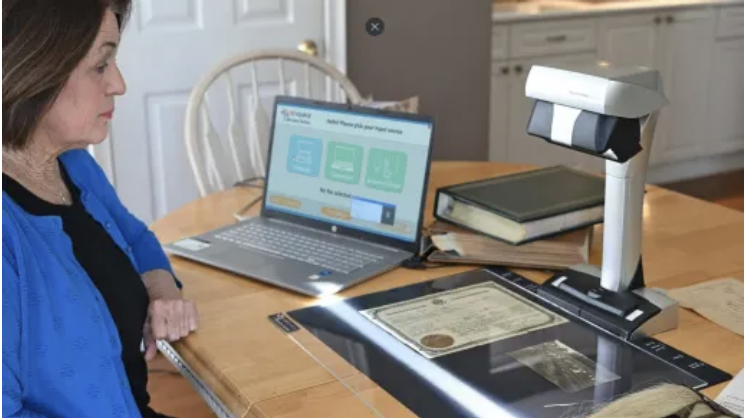
The Memory Station consists of hardware and software: the hardware being a scanner that “looks down” at photos placed before it on a special mat (and can do books, documents, 3D objects as well), plus specialized software. Using the software you will be doing a number of things so as to create your video story. This will be saved as a MP4 video file that is compatible with today’s video viewing programs, from computers to phones to tablets, smart TVs, etc. Setup is simple — place the included SnapScan V600 scanner on a table with the mat and connect the scanner to a laptop or computer that will run the software. It also helps to have decided in advance as to the photos that will be used and as to the voice commentary that will be spoken for each of the photos
The Process
Stated simply, the process is as following:
Place the photos that you want to scan on the surface of the pad (curling can be avoided either by first flattening them or using the optional acrylic transparent sheet to keep them flat).
Run the software and activate a scan.
Go to the Restore software option and “clean up” each image as needed — be that altering the color, adding contrast/brightness, etc. Restore analyzes each image and applies their patented algorithm to make it easy to make OLD pictures, or those faded 60/70/80’s pictures, and even today’s digital pics look great –with just one click, for those who don’t wish to work through it on their own.
Add a voice commentary to those images.
Run the Stories option and use it to arrange the photos in the order desired and then save the results.
Vivid-Pix also provides a number of video tutorials to help you better understand how Memory Station works and as to to getting the kind of results that you want.
New York City In The 1980’s
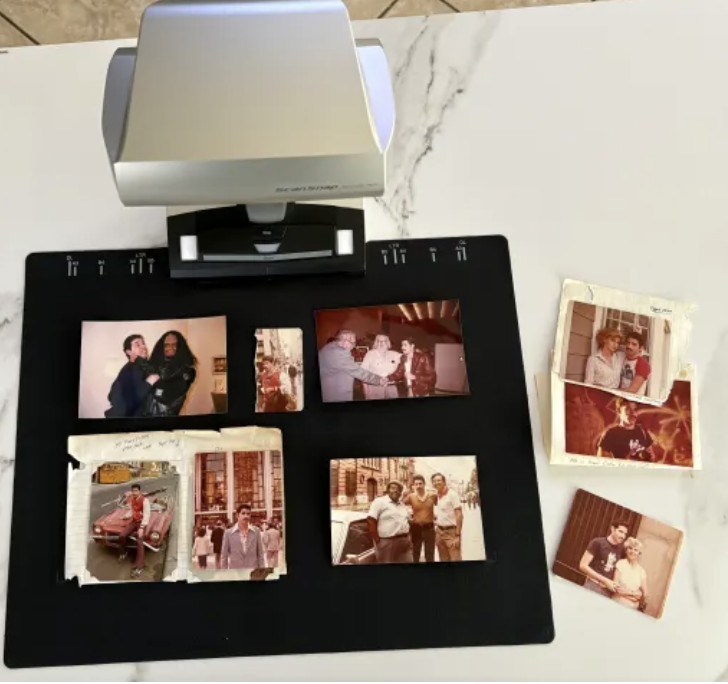
So as our first attempt, we went with a simple theme: our going to live in New York City after graduating. The 1980’s were wild times, or at least we were (being too young to know better), with many of those that we grew up with also coming to NYC, as well as running into friends we had made back in California.
Roaming the streets, from Time Square to Alphabet City to SoHo to the East Village, we had accumulated a lot of photos – hey taking pictures with a half frame Leica rangefinder since High School and ending up opening a photographic studio in NYC later on seemed a fair progression.
Putting this video story together was fun, it didn’t take a lot of time and our (somewhat) rambling non-PG voice commentary got a lot of laughs from those it was sent to (and probably even more groans). It was great being able to watch all this as a “story” rather than just having a number of digitized pictures in a folder on a hard drive to bring up on the screen. Plus we didn’t ever again have to worry about keeping the originals from being bent, torn, faded, etc.
There Are No Limits to What You Can Do
Our next “story” is going to be a lot more ambitious, as it is to be a chronicling of our Father’s time in the Philippines during WWII. Pictures abound but like many who served back then, he was pretty tight lipped about it all. However once in the early 90’s he sat down and discussed a short history of his life prior to and during WWII as we videotaped it on our VHS-C camcorder.
So what we are going to try and do is to use a digital video converter to take the “voice” off of the tape from our still working videocassette player and digitize it (using a free audio program) and then arrange his voice into snippets that can be played and recorded as commentary to related pictures and documents and medals. We know our immediate/extended family will love to get this. It’s something we’ve been wanting to do for years but never had an easy approach for doing it, prior to Memory Station.
Tell Your Story
Stories that Memory Station can generate can vary as widely as the people who tell them — a birthday party, graduation ceremony, retirement event, a day at the beach or presenting a patriarch or matriarch are just some of the possibilities. It’s the person who provides the will and the drive that Memory Station can take to provide a finished outcome; taking the passivity out of the equation and letting a person break out from just being a watcher of events in their life and instead being able to pass them on to others.
Now while the Memory Station provides all that is needed, Vivid-Pix realized that there are many who already have a scanner, such as found as part of an all– in-one printer. So those people can get the Memory Station software as a stand-alone product. The only issue with the software is that it is not for Macintosh computers (although Restore has a Mac component and the scanner itself is also Mac compatible),
The Memory Station provides the means for capturing past moments and preserving them for future generations in a straightforward and positive manner.
For more details go to https://www.vivid-pix.com/memorystation/