A Desk That Stands Is A Standing Desk
All the arguments against a standing desk are pretty much gone now — it’s better to work standing up then sitting down all day. Because even with those apps that remind you to stop sitting and get up, few do and being sedate is far from healthy no matter your age or makeup. So with that out of the way we’re all for a standing desk. Except.
Except the height of the desk might not be right for the person. It might be just a bit too high or a bit too low to provide the kind of comfort needed, especially if a keyboard is part of the mix. Even if going old-school and not using a computer and staring at a monitor, there’s no joy in having a standing desk that doesn’t match up with your body.
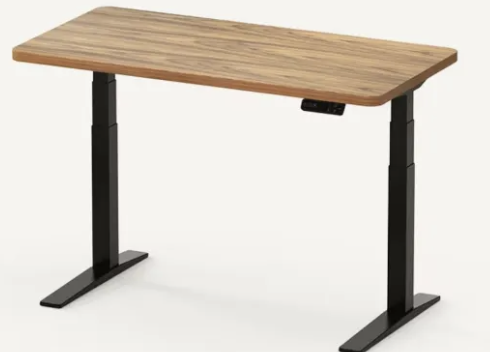
But if the desk is motorized, then all those issues of height goes away because the height now becomes a matter of taste and not a manufacturer’s choice. So the desk needs to easily adjust its height on command and look good while doing so (because we’re not barbarians). That’s where the E7B-Pro Standing Desk comes in. Because it does all that but goes even father where the desktop is concerned.

Together We Stand Once It’s Put Together
The E7B-Pro comes in two boxes: one box holds the skeleton that comprises the desk ( made of carbon steel), with the other holding the desktop. Assembly is not complicated but is a bit involved. One person can do it all, although as will be seen later on it will be best for two to right the desk before moving it to its final location. So the instruction booklet is large and simple to follow: illustrations being big enough due to the many parts not being small themselves. To summarize, you are attaching parts to the desktop which is flat on the floor – more on the top in a moment. You start by attaching side brackets to a beam, followed by adjusting it so that each end meets a side of the desktop, which is then screwed in. The leg columns go next, followed by the two feet and the keypad (whose wires are then connected as is the cable tray. The foot pads now are inserted and set to the same depth with each other (this can/will be changed so as to eliminate wobble).
Three tips: Use the desktop’s styrene packing sheet as the surface for doing the desk. An electric drill makes screwing in sections easier. Read ahead of the step you are about to do to get a better feel for what must be done.
Upright Goes The Desk
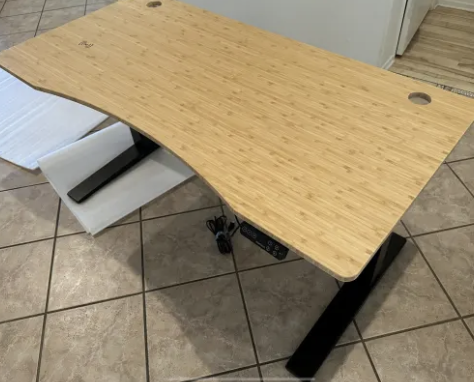
The desk must now be flipped upright — which is where the second person comes in. There is a good deal of weight here so be careful (we wore a back brace to avoid even the slightest chance of trouble and remembered to bend at the knees, not bend over when lifting). While all the parts are supplied (plus a screwdriver setup and Allen wrench), you must provide an electric drill. We assembled the desk in one session – taking about an hour as we weren’t in a hurry. Then we had to wait till the next day as that’s when the second person was available.
Now you probably thought we forget all about the desktop — we didn’t. But it’s not so simple as to just get it in one color or another. That’s because FlexiSpot makes a number of different desktops available (in various sizes starting at 55×28” and going up to 79×35”). The types include chipboard and solid wood among others, but the one that we have being used is the light colored bamboo (sustainable, harder than normal wood and resistant to water and scratches), which has more going on because it has a Q1 pad built in.

Motorized For Your Convenience
Being that this desk is motorized (with wire management), obviously there’s going to be a wall outlet needed. The keypad comes with USB ports, is touch sensitive and has an on/off but also a child lock with LED notification light to keep pesky tiny hands from causing mischief. Height can be changed —the LED display showing this — and up to 4 different heights can be saved into memory and accessed directly (with height adjustability ranging from 25” to 50.6 inches). This means you can have one setting for standing at the desk, with another to quickly change its height because you decided to. Besides changing the sensitivity of the controls, the desk is “smart” enough to stop rising and reverse direction should it come into contact with another object. An example of this happening would be if the desk was up against a wall and there was a shelf mounted up above it.
That the legs are designed to not take up much room (being semi-c design), add to that a strong system of lifting (extended overlapping column pipes) and 2 motors to make the sound of the desk lifting/lowering sounding like softly crumpled paper being rubbed against someone’s arm.
We’re used to standing desks (having used one for the last 15+ years) but have had to get used to its height not being quite what would have been best for us. Those days are over. And the Q1 pad means we can just place our iPhone flat down, rather than on the cradle we’ve been using. Less chance of it slipping off for sure. Plus the desk’s bearing weight of 440lbs means we’re not one bit worried about what we put on it.
For more details on the E7B-Pro Standing Desk, go to https://www.smartwingshome.com/


_final_20260515-1-1024x1024.jpg)